Cruise calls
Keep ship calls, ports and timings in one calendar, and plan tours around what is actually arriving.
DreamTeamPlan brings cruise calls, tours, guide staffing, venue bookings and drivers together for your operations team, and gives every guide a simple mobile app for availability, offers and tasks.
This site presents DreamTeamPlan. Features marked Planned or Idea are not available yet.
Managers, dispatchers and administrators work from the same live picture instead of spreadsheets, chat threads and phone calls.
Keep ship calls, ports and timings in one calendar, and plan tours around what is actually arriving.
A daily view of departures with group numbers, timings and what still needs a guide, a venue or a driver.
See who is available, send offers to guides and follow answers as they come in. Changes to an accepted tour are flagged clearly to the guide.
Track bookings with restaurants and attractions per day and ship, with guest numbers that follow the tour.
Assign drivers and bus registrations per tour so everyone on the day knows who is driving what.
Standard operating procedure checklists for venues and guides, and a daily e-mail report built from what was actually done, once e-mail sending is switched on.
Dispatchers and coordinators get the same offer flow as guides, with their own availability and a reliability index.
A feedback link and QR code for each guide assignment lets guests leave feedback. Guide ratings are reviewed by a manager before anything counts.
An earnings report per guide and period, one set of numbers your office can check. Payments are made outside the app.
Assign managers to the ports they work in, and give owners an overview of activity across ports.
Import cruise calls and tour allotments from Excel files.
Review costs by departure, day or cruise call, and manage shared-bus cost groups.
Save cancellation terms and review cancellation records and calculated charges for cancelled departures.
When no guide is available, ask guides to check their availability for a cruise call.
Guides open the app, see their offers first, answer in a tap and keep their calendar up to date. No spreadsheets, no group chats.
Illustration of the guide app. Sample data.
Every offer keeps its history: accepted, declined, taken by another guide or withdrawn, with the reason when the office cancels.
Guides sign in to the same system the office uses, so an answer in the app updates the plan straight away.
Guides can create their own account and profile with availability, languages and tours, and the office approves who joins.
The people who run your tours are your most important resource. DreamTeamPlan keeps what you need to know about them in one place.
Each guide has a profile with availability, languages and tours. Self-registered guides join your pool only when your office approves them.
Send offers, follow the answers and see the full history of who was asked, who accepted and what changed afterwards.
Guest feedback and operational ratings build an index per guide, and a manager reviews entries before they count.
See what each guide earned in a period, in one report your office can check.
What is live today is described above. The items below are not available yet, and the labels say how far along each one is.
Prepare for a cancelled call in advance, instead of reacting when it happens.
An automatic proposal for who should work which tour, which the office can accept or change.
Connect guide earnings to the payment tools you already use.
Direct connections to cruise company data systems. Excel import of calls and allotments is already available.
In-app calendars and notifications are available. Connections to external calendar and messaging services are planned.
An optional add-on that can be built into the app if it suits your company: route timings are recalculated automatically when plans change, and an AI model suggests suitable visit times for each venue.
Each week your company receives a copy of the data it holds in the app and the work it has done there, so your data stays with you if anything goes wrong.
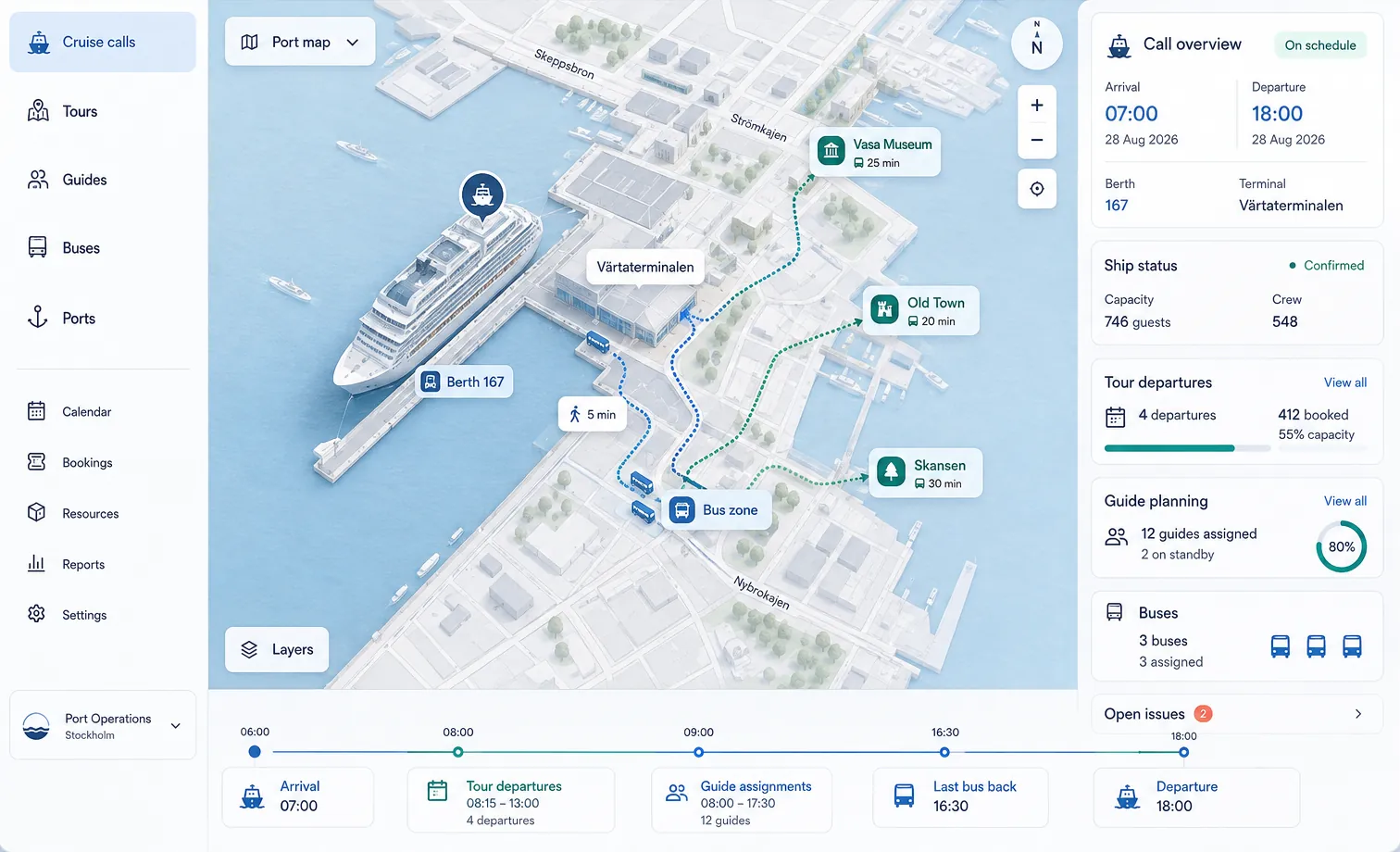
One screen per call with berth, terminal, bus zone and walking times to the sights, as in the illustration at the top. This is an idea for a future version.
Let an assistant read incoming schedules and prepare entries for you to check.
A separate DreamTeamPlan for another company with its own guides and cruise calls.
The same flow every day, with nothing lost between people.
Enter or import cruise calls and tours. See what each day needs.
Send offers to guides, assign drivers and book venues. Answers and changes appear in one place.
Guides work from their task sheet; the office gets the daily report and guest feedback.
Tell us about your operation and we will walk you through DreamTeamPlan.
Request a demo